Understanding Oracle GoldenGate’s Data Extraction Process
Oracle GoldenGate is a tool used to replicate data between databases in real-time. It helps keep databases in sync, which is useful for backups, migrations, reporting, and high availability.
What is the “Extract” Process?
The Extract process is the first step in GoldenGate’s data replication. Think of it like it keep on checking data in the source database and picks up changes.
Extract Process are of two types:
Classic Extract
Classic Extract is the original method used by Oracle GoldenGate to capture changes from a source database. It works by reading the database’s log files directly (like redo logs or archive logs) from the file system.
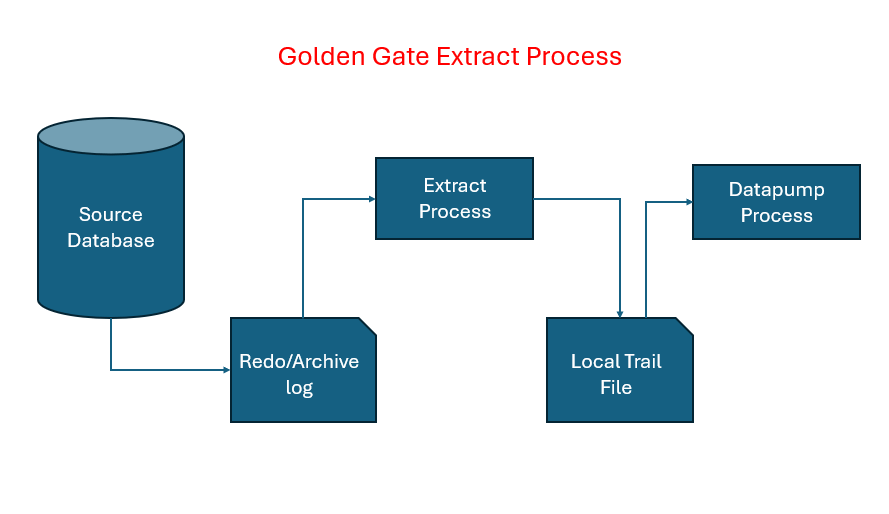
Following are the steps involved in Classic Extract process:
- Monitoring the Source Database
- Extract keeps an eye on the transaction logs (called redo logs in Oracle).
- These logs record every change made to the database (like insert, update, delete).
- Capturing the Changes
- When something changes in the database, Extract captures that change from the logs.
- It doesn’t touch the actual tables—it just reads the logs.
- Filtering and Formatting
- Extract can be configured to filter which tables or rows to capture.
- It then formats the captured data into a GoldenGate-specific format.
- Writing to a Trail File
- The captured data is written to a trail file (like a temporary storage).
- This file is used by the next process (called Data Pump or Replicat) to send or apply the changes to the target database.
Integrated Extract
Integrated Extract is a more advanced and efficient version of the Extract process. It works inside the Oracle database and uses Oracle’s internal tools (like LogMiner) to capture changes.
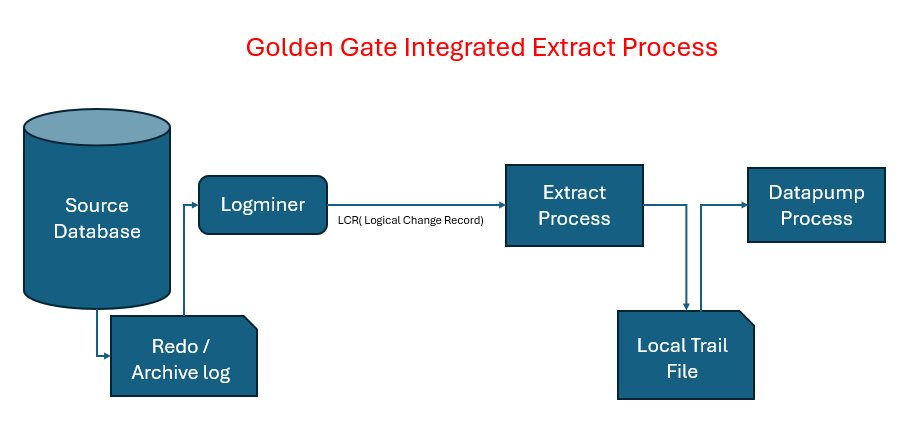
How It Works (Step-by-Step):
- Starts Inside the Database
- Unlike Classic Extract, Integrated Extract runs as a server-side process within Oracle.
- Uses LogMiner
- It uses Oracle’s LogMiner API to read redo logs.
- This allows it to understand complex data types and compressed tables better.
- Captures Changes Efficiently (LCR Logical Change Record)
- It captures DML (insert, update, delete) and DDL (create, alter, drop) operations.
- Supports parallel processing, which means it can handle large volumes of data faster.
- Writes to Trail File
- Just like Classic Extract, it writes the captured changes to a trail file.
- This file is then used by Replicat to apply changes to the target database.
Note: Log Miner will do scanning of the redo files and give the required data in term of LCR (logical change record) to extract process. Intergrated Process only used for Oracle Database.
What is Initial Load in Oracle GoldenGate?
Initial Load is the process of copying the existing data from the source database to the target database before real-time replication begins. For First time handling data which exists in the database while configuring Oracle Golden Gate for Replication
Initial Load Process: This is used during initial load of tables which already exists and have data in it. In this process, it reads data directly from database and not from transactional logs. For Oracle database, we prefer to go with datapump (EXPDP or IMPDP for initial data transfer), but we need to keep all archive log from source from when EXPDP process start.
Data Pump in GoldenGate
The Data Pump is an optional secondary Extract process that reads data from the local trail file (created by the primary Extract) and sends it to the target system.
Main benefits of using a Data Pump:
- Network Isolation & Security
- Keeps the primary Extract process isolated from network issues.
- Only the Data Pump connects to the target, reducing risk to the source.
- Data Filtering or Transformation
- You can apply filters or transformations before sending data to the target.
- Improved Fault Tolerance
- If the network or target system goes down, the Data Pump can buffer data locally until it’s back up.
- Multiple Targets
- One Data Pump can send data to multiple targets or multiple trail files.
- Compression
- Supports data compression to reduce network load.
| Feature | With Data Pump ✅ | Without Data Pump ❌ |
|---|---|---|
| Network Resilience | High | Low |
| Buffering | Yes | No |
| Filtering/Transformation | Possible | Not possible |
| Multi-target Support | Yes | Limited |
| Performance Impact | Lower on Extract | Higher on Extract |
Note:
- In a one-to-many replication setup, separate Data Pump processes are configured for each target. This ensures that if the network to one target fails, it does not impact the replication flow to other targets. Each Data Pump independently manages data delivery, providing fault isolation and improved reliability.