The CALCULATE function in DAX is a key feature in Power BI. It lets users change the filter context of an expression for more advanced calculations and dynamic aggregations.
What is the CALCULATE Function?
The CALCULATE function evaluates an expression with a changed filter context. It’s useful for applying conditions to aggregations, like summing sales for a certain region or time.
Syntax:
CALCULATE(<expression>, <filter1>, <filter2>, ...)<expression>: The calculation to be performed (e.g.,SUM(Sales[SalesAmount])).<filter1>, <filter2>, ...: The conditions that modify the filter context.
Example 1: Using CALCULATE to Filter a SUM
Consider a sales table:
| Product | Region | SalesAmount |
|---|---|---|
| A | East | 100 |
| B | West | 200 |
| C | East | 150 |
| D | West | 300 |
To calculate total sales only for the “East” region:
Total Sales East = CALCULATE(SUM(Sales[SalesAmount]), Sales[Region] = "East")Result: 100 + 150 = 250
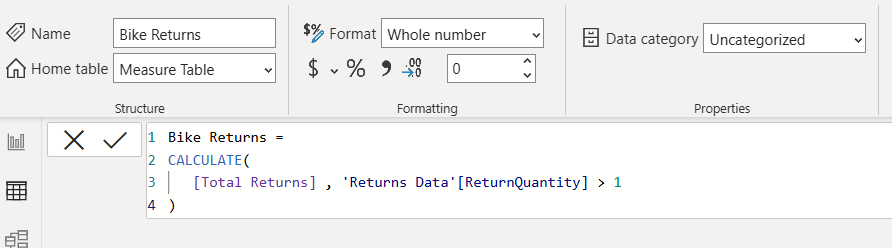
Example: Total Returns is a measure from count(ReturnQuantity)
Example 2: Using CALCULATE with Multiple Filters
You can apply multiple filters by adding more conditions.
For example, to calculate total sales for the “East” region where SalesAmount is greater than 100:
Filtered Sales = CALCULATE(SUM(Sales[SalesAmount]), Sales[Region] = "East", Sales[SalesAmount] > 100)Result: 150 (only the second row meets both conditions).
Example 3: Using CALCULATE with ALL to Remove Filters
The ALL function removes filters from a table or column. For example, if you want to calculate the total sales ignoring any existing filters:
Total Sales All = CALCULATE(SUM(Sales[SalesAmount]), ALL(Sales))This returns the sum of all SalesAmount values, regardless of filters applied elsewhere in Power BI.
Example 4: Using CALCULATE with FILTER
To calculate total sales for products where SalesAmount is greater than the average sales amount:
High Sales = CALCULATE(SUM(Sales[SalesAmount]), FILTER(Sales, Sales[SalesAmount] > AVERAGE(Sales[SalesAmount])))This filters out sales below average and adds the rest.
Key Takeaways
CALCULATEchanges the filter context of an expression.- It is often used to apply conditions dynamically in measures.
- It works well with functions like
ALL(to remove filters) andFILTER(to create custom filters). - It enables more advanced DAX calculations for reports and dashboards.