Truncate SQL Server Transaction Log file in Microsoft SQL Server
We can do it in two ways: One with SQL Server Management Studio or the other with commands:
1. Change the recovery mode from full to simple.
ALTER DATABASE dbname SET RECOVERY SIMPLE;SQL Server Management Studio: Right-click on the database –> Select Properties –> Options

2. By using DBCC commands shrink the transaction log file.
Command based:
DBCC SHRINKFILE (@dbfilename , 1024)
Example:

DBCC SHRINKFILE ('AdventureWorks2017_log',1024)
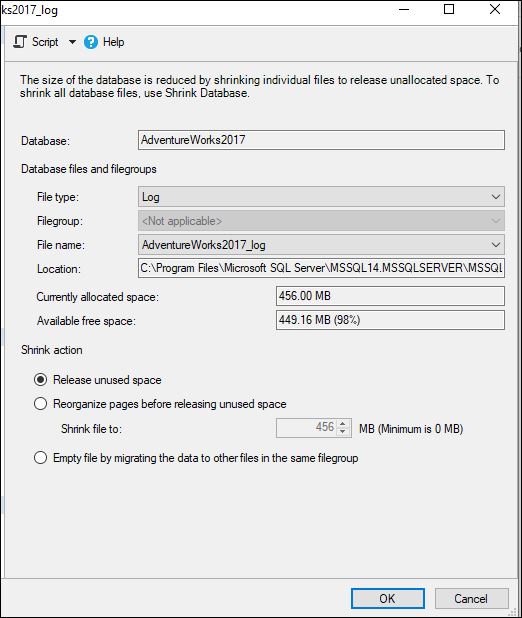
SQL Server Management Studio: Right-click on Database Name (AdventureWorks2017) –> TASKS –> SHRINK –> FILES. Select the log file from file type as shown and shrink.
3. Change back the recovery mode of the database to full.
ALTER DATABASE dbname SET RECOVERY FULL;
4. After changing the recovery model, you should take the full backup of the database.
Note: If log shipping or database mirroring is established please do not follow the above method.
1. Take a full backup of the database and log file.
2. Shrink the transnational log file of the database:
dbcc shrinkfile(dbfilename,1024);