- Monitor the size of log files for all the databases in SQL Server:
SELECT DB_NAME(database_id) as DatabaseName,
file_id,
name as FileName,
type_desc as FileType,
size*8/1024 as SizeMB,
growth*8/1024 as GrowthMB
FROM
sys.master_files where type = 1;
Output:
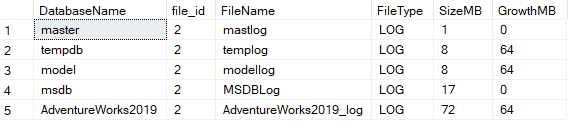
Create a script for automate the shrink process when it goes to specific threshold value.
Following is the shrink Script:
Use Master
Go
Declare @DbName nVARCHAR(128);
Declare @ShrinkCommand nVarchar(max);
Declare @v_ThresholdSizeMB Decimal(18,2) = 2000;
-- Declare cursor and exclude system databases
Declare db_cursor cursor for
SELECT name FROM sys.databases where database_id not in (1,2,3,4) and state_desc='ONLINE';

OPEN db_cursor
Fetch NEXT FROM db_cursor INTO @DbName;

While @@FETCH_STATUS=0
BEGIN
    SET @ShrinkCommand = 'USE [' + @DbName +']; ' +
    'IF (SELECT size*8/1024 FROM sys.master_files WHERE type=1 and DB_NAME(database_id)='''+@DbName+''') > ' +
                      CAST (@v_ThresholdSizeMB as NVARCHAR) +
    ' BEGIN' +
    ' DBCC SHRINKFILE (' + CAST((SELECT FILE_ID FROM  sys.master_files where type=1 and DB_NAME(database_id)=@DbName) as NVARCHAR) +
    ','+
     CAST(@v_ThresholdSizeMB as NVARCHAR) + ');' + 'END;';
	 print @shrinkcommand;
EXECUTE sp_executesql @ShrinkCommand;

Fetch next from db_cursor into @DbName;
END
CLOSE db_cursor;
DEALLOCATE db_cursor;
Scheduled this script into SQL Server Agent:
- Open SQL Server Management Studio.
- Go to SQL Server Agent –> Jobs.
- Right-click and select New Jobs.
- In the new job windows: –Enter the Name of the Job –Go to steps page — Step Name — Select type TSQL –choose database — Command — Copy paste the shrink space.
- Go to the Schedules page, Click New , and define a schedule.
- Click OK to save the job.