Enable JavaScript for Windows Internet Explorer
Error: Your browser does not have Javascript enabled. Javascript is required to use this application.
For this you need to enable active script in scripting heading
Error: JavaScript is required. Enable JavaScript to use OAM Server.
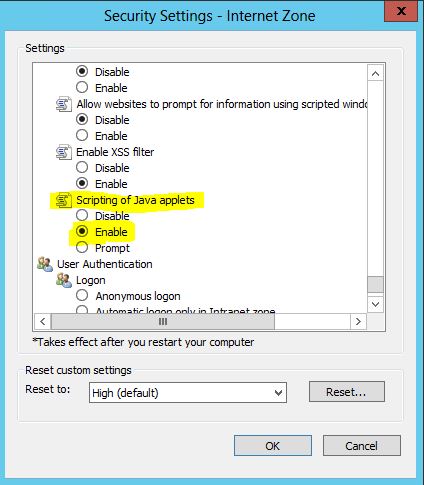
For this error you also need to enable java applet in scripting heading.
1. Select Internet Options from the Tools menu.

2. Click the Security tab and go to Custom Level
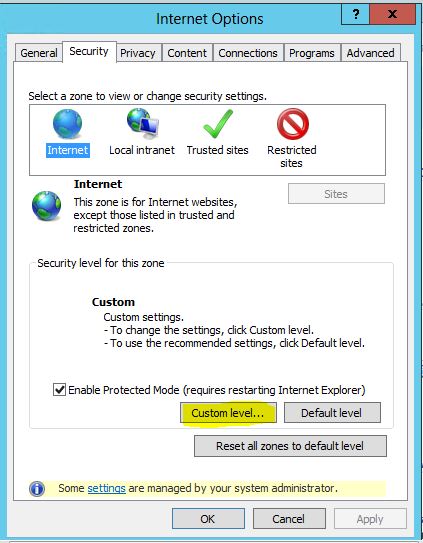
3. Scroll down to Scripting, near the bottom of the list.Under Active Scripting, choose Enable.

4. Enable the java applet as follows:
5. Click OK to leave Security Settings. Click OK to leave Internet Options.
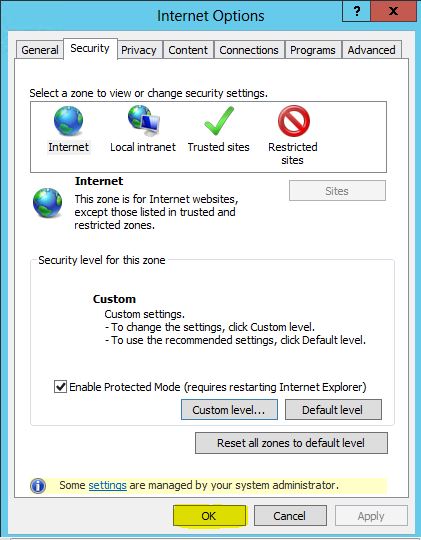
6. You will need to close and restart your browser for the settings to take effect.