Regular backups are essential for disaster recovery and data protection.
SELECT database_name, backup_finish_date, type FROM msdb.dbo.backupset ORDER BY
backup_finish_date DESC;
Using SQL Server Management Studio (SSMS)
Open SSMS and connect to the SQL Server instance.
In Object Explorer, right-click the database you want to monitor.
Navigate to Reports > Standard Reports > Backup and Restore Events.
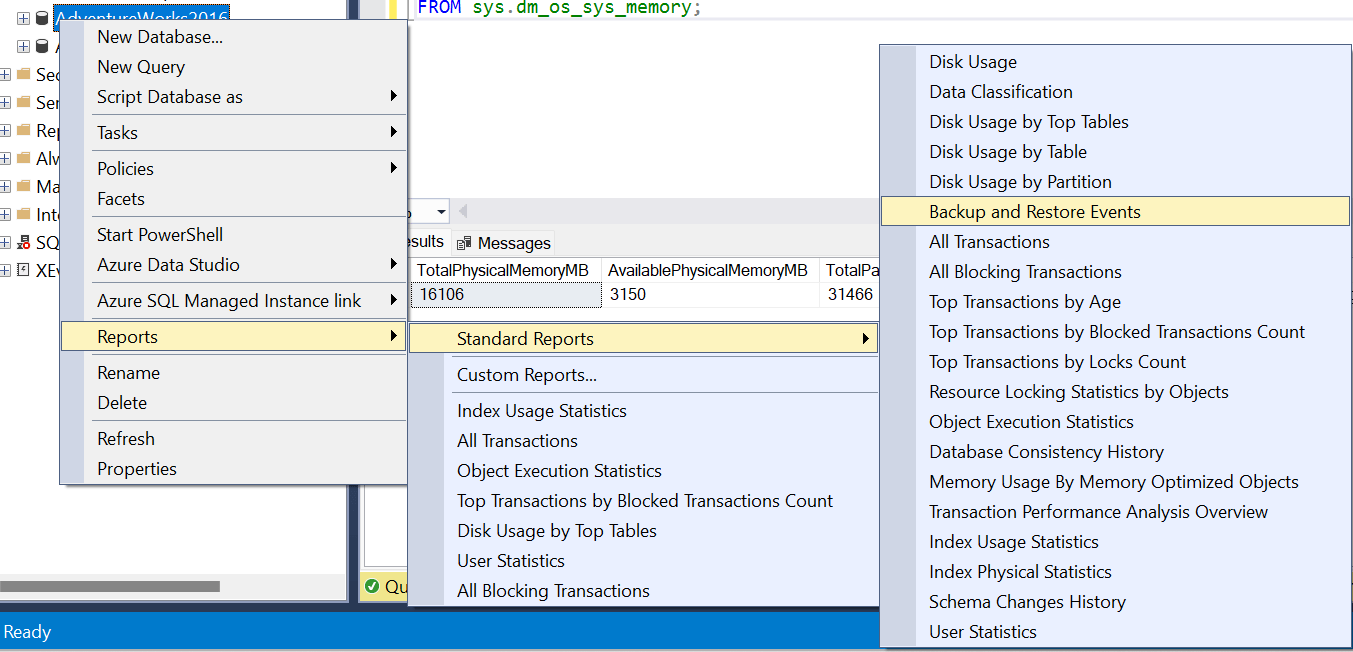
2. The msdb database to get information about backup history
SELECT
 d.name AS DatabaseName,
 b.backup_start_date,
 b.backup_finish_date,
 b.backup_size / 1024 / 1024 AS BackupSizeMB,
 b.type AS BackupType,
 CASE
 WHEN b.type = 'D' THEN 'Full'
 WHEN b.type = 'I' THEN 'Differential'
 WHEN b.type = 'L' THEN 'Log'
 END AS BackupTypeDescription
FROM msdb.dbo.backupset b
JOIN msdb.dbo.sysdatabases d ON b.database_name = d.name
ORDER BY b.backup_finish_date DESC;
In SQL Server, the msdb database maintains a set of tables that store information about backup
and restore operations. Here are some of the key tables related to backups:
- backupset:
- Stores backup set details like type, times, and size.
- Example columns:
backup_set_id,database_name,backup_start_date,backup_finish_date,type,backup_size, etc.
- backupmediafamily:
- Stores media backup information, including device names.
- Example columns:
media_set_id,media_family_id,logical_device_name,physical_device_name, etc.
- backupmediaset:
- Contains details about the backup media set, such as media set ID and count.
- Example columns:
media_set_id,backup_start_date,media_family_count, etc.
- backupfile:
- Stores information about files included in backups, including their names.
- Example columns:
backup_set_id,file_id,logical_name,physical_name, etc.
- backupfilegroup:
- Stores information about filegroups included in backups.
- Example columns:
backup_set_id,filegroup_id,filegroup_name, etc.
- restorehistory:
- Stores information about restore operations, including sequence number and date.
- Example columns:
restore_history_id,restore_date,destination_database_name, etc.
- restorefile:
- Stores information about files restored, including their names.
- Example columns:
restore_history_id,file_id,logical_name,physical_name, etc.
- restorefilegroup:
- Stores information about filegroups restored.
- Example columns:
restore_history_id,filegroup_id,filegroup_name, etc.