How to Enable Long Paths in Windows 11

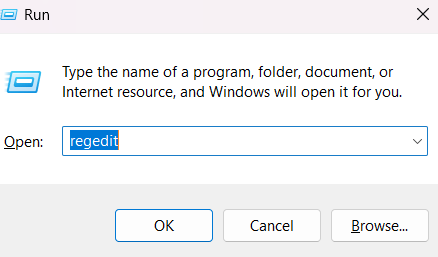
A. Press the Win + R to open the RUN dialog box.

B. Type the regedit on text box of RUN dialog box and press Enter.

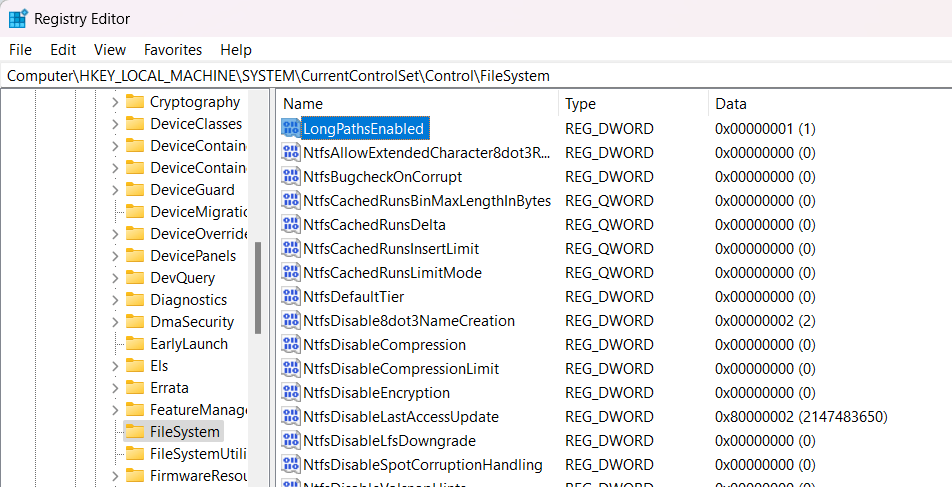
C. Navigate to following location: Computer\HKEY_LOCAL_MACHINE\SYSTEM\CurrentControlSet\Control\FileSystem

D. Set the LongPathsEnabled to 1.

E. Close the Registry Editor and restart your computer.

    Unknown's avatar

    Author: SandeepSingh

    Hi, I am working in IT industry with having more than 15 year of experience, worked as an Oracle DBA with a Company and handling different databases like Oracle, SQL Server , DB2 etc Worked as a Development and Database Administrator.

    Leave a Reply

    Discover more from SmartTechWays - Innovative Solutions for Smart Businesses

    Subscribe now to keep reading and get access to the full archive.

    Continue reading