Check the statistics of tables in SQL Server
SELECT sp.stats_id,
       name,
       filter_definition,
       last_updated,
       rows,
       rows_sampled,
       steps,
       unfiltered_rows,
       modification_counter
FROM sys.stats AS stat
     CROSS APPLY sys.dm_db_stats_properties(stat.object_id, stat.stats_id) AS sp
WHERE stat.object_id = OBJECT_ID('[Sales].[Customer]');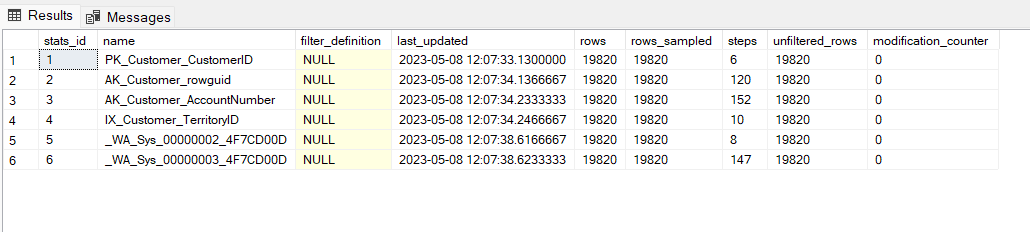
Check the Stats by DBCC package
DBCC SHOW_STATISTICS ('[Sales].[Customer]','AK_Customer_rowguid')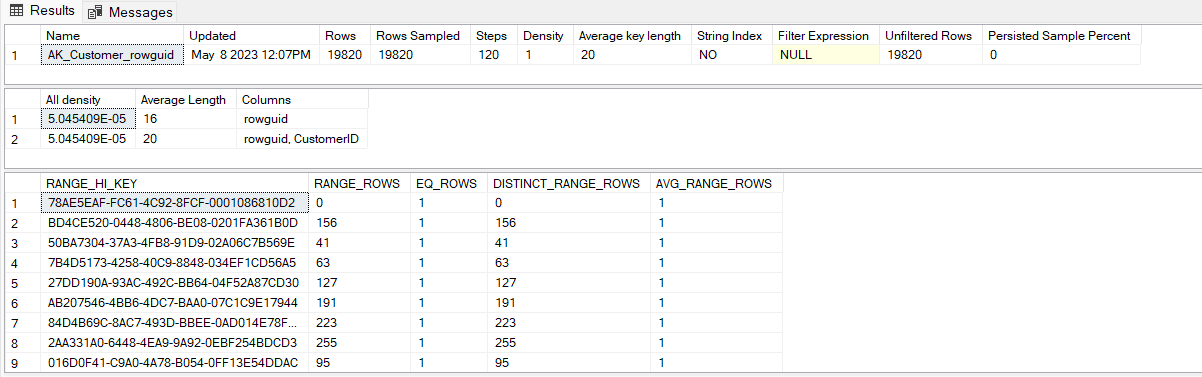
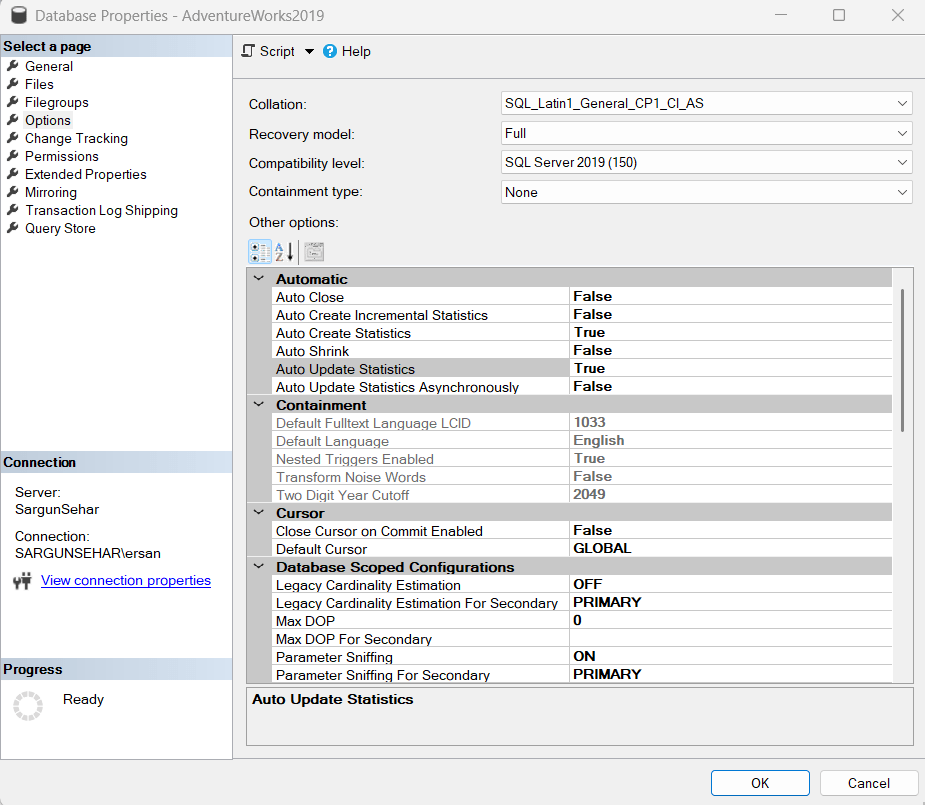
Check the status of automatic jobs for update statistics of objects in SQL Server
Right Click to the database name –> Open the Properties –> Go to option panel –> You will get the status of automatic jobs in SQL Server as below:
Update the Statistics of tables Manually:
1. Updating All Statistics in a Table
To update all statistics for a specific table, run:
UPDATE STATISTICS YourTableName;2. Updating Statistics for a Specific Index
If you want to update statistics for a particular index, use:
UPDATE STATISTICS YourTableName(IndexOrColumnName);
example:

UPDATE STATISTICS SALES.Customer(PK_Customer_CustomerID);
3. Updating All Statistics in the Database
To refresh all statistics across the database:
EXEC sp_updatestats;


Example:
Updating [Sales].[SalesTaxRate]
    [PK_SalesTaxRate_SalesTaxRateID], update is not necessary...
    [AK_SalesTaxRate_StateProvinceID_TaxType], update is not necessary...
    [AK_SalesTaxRate_rowguid], update is not necessary...
    0 index(es)/statistic(s) have been updated, 3 did not require update.

Updating [Sales].[PersonCreditCard]
    [PK_PersonCreditCard_BusinessEntityID_CreditCardID], update is not necessary...
    [_WA_Sys_00000002_03F0984C], update is not necessary...
    0 index(es)/statistic(s) have been updated, 2 did not require update.

Updating [Person].[PersonPhone]
    [PK_PersonPhone_BusinessEntityID_PhoneNumber_PhoneNumberTypeID], update is not necessary...
    [IX_PersonPhone_PhoneNumber], update is not necessary...
    [_WA_Sys_00000003_05D8E0BE], update is not necessary...
    0 index(es)/statistic(s) have been updated, 3 did not require update.

Updating [sys].[sqlagent_jobs]
    [sqlagent_jobs_clust], update is not necessary...
    [sqlagent_jobs_nc1_name], update is not necessary...
    0 index(es)/statistic(s) have been updated, 2 did not require update.

Updating [Sales].[SalesTerritory]
    [PK_SalesTerritory_TerritoryID], update is not necessary...
    [AK_SalesTerritory_Name], update is not necessary...
    [AK_SalesTerritory_rowguid], update is not necessary...
    [_WA_Sys_00000003_0697FACD], update is not necessary...
    0 index(es)/statistic(s) have been updated, 4 did not require update.

Updating [sys].[sqlagent_jobsteps]
    [sqlagent_jobsteps_clust], update is not necessary...
    [sqlagent_jobsteps_nc1], update is not necessary...
    [sqlagent_jobsteps_nc2], update is not necessary...
    0 index(es)/statistic(s) have been updated, 3 did not require update.

Updating [Person].[PhoneNumberType]
    [PK_PhoneNumberType_PhoneNumberTypeID], update is not necessary...
    0 index(es)/statistic(s) have been updated, 1 did not require update.
4. Using FULLSCAN for accurate Statistics
By default, SQL Server samples data when updating statistics. For a full scan, use:
UPDATE STATISTICS YourTableName WITH FULLSCAN;
This ensures the most accurate statistics but can be resource-intensive.
5. Using Sampling for faster update stats:
UPDATE STATISTICS TableName WITH SAMPLE 50 PERCENT;
or
UPDATE STATISTICS TableName WITH SAMPLE 10000 ROWS;
Does Rebuilding Indexes Update Statistics?
When an index is rebuilt using:
ALTER INDEX ALL ON YourTableName REBUILD;
- YES, it updates the statistics for that index
- NO, it does not update column statistics
Thus, it is often necessary to manually update statistics after index rebuilding, especially for non-indexed columns.