Steps to configure the initial load extract and replicat process for existing data in databases in Oracle Golden Gate
Initial load in GoldenGate refers to transferring all data from the source to the destination server. If a database already has 100 GB of data and we want to replicate it with GoldenGate, we must set up this data on the destination using an initial load or expdp before starting the replication. This initial load helps to move data from the source to the destination before the replication service begins.
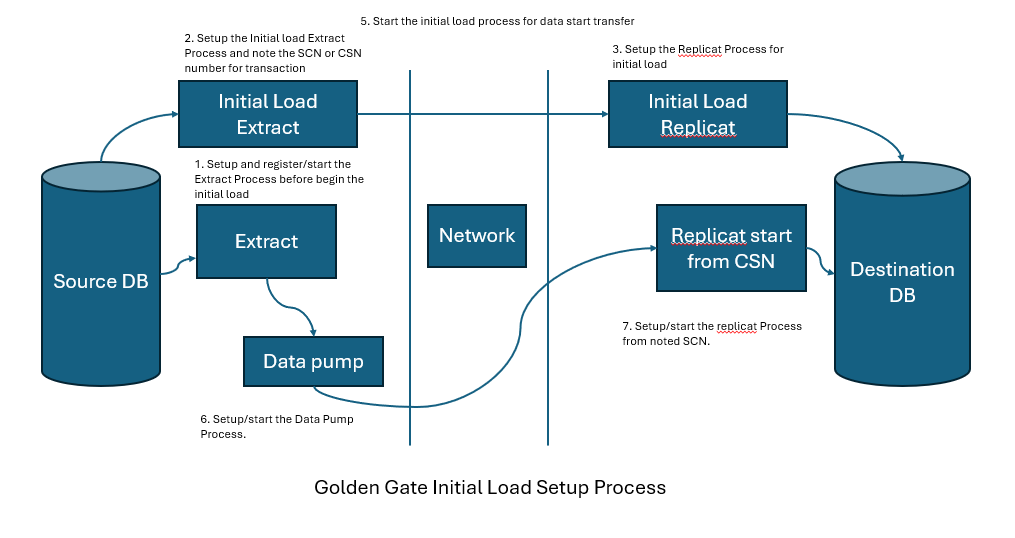
Note: Register the Integrated Extract process before the initial load or datapump starts, so we can easily capture the data afterward.
Example:
Suppose we started the initial load like a datapump at 7:00 AM, which took 2 hours and completed at 9:00 AM. The source database data up to 7:00 AM goes to the destination server database, so both are aligned at 7:00 AM. We can start the extraction process at 7:30 AM, but the registration for the integration extraction process must be completed before 7:00 AM.
Note: In integrated extract, we cannot go back after register the extract process, but in classic extract, we can do so easily.
For classic extract command to go back or time as archive is available.

alter extract extract_name begin <time>;
OR
alter extract extract_name begin csn <>'
Following are the steps for Initial load using extract process
1. Enable supplemental logging for the object, schema, or database you want to replicate.
2. Create two tables in the HR and SCOTT schemas for the initial load example. The HR schema contains data that will be replicated to the SCOTT schema. The following statement only creates the data table structure in the SCOTT schema.
create table hr.data as select object_name,object_type,created from dba_objects

create table scott.data as select object_name,object_type,created from dba_objects where 1 = 0
3. Enable supplemental logging for table which is must to be enabled
-- login to the database
GGSCI (localhost.localdomain) 30> dblogin USERID gguser@localhost:1521/pdb1, PASSWORD gguser
Successfully logged into database.

--- enable logging for table
GGSCI (localhost.localdomain as gguser@orcl) 32> add trandata hr.data

2025-08-10 13:39:19  INFO    OGG-15130  No key found for table HR.DATA.  All viable columns will be logged.
2025-08-10 13:39:19  INFO    OGG-15132  Logging of supplemental redo data enabled for table HR.DATA.
2025-08-10 13:39:19  INFO    OGG-15133  TRANDATA for scheduling columns has been added on table HR.DATA.
2025-08-10 13:39:19  INFO    OGG-15438  Enabling logical replication (with all keys) on auto capture table HR.DATA.
2025-08-10 13:39:19  INFO    OGG-15135  TRANDATA for instantiation CSN has been added on table HR.DATA.
2025-08-10 13:39:20  INFO    OGG-26035  Logical replication for table HR.DATA is ENABLED.
2025-08-10 13:39:20  INFO    OGG-10471  ***** Oracle Goldengate support information on table HR.DATA *****
Oracle Goldengate support native capture on table HR.DATA.
Oracle Goldengate marked following column as key columns on table HR.DATA: OBJECT_NAME, OBJECT_TYPE, CREATED
No unique key is defined for table HR.DATA.
4. Now setup the Extract process before start or setup the Initial load extract process.
GGSCI (localhost.localdomain as gguser@orcl) 40> view param ext02

EXTRACT ext02
USERID gguser@localhost:1521/pdb1, PASSWORD gguser
discardfile /u01/app/oracle/product/gg/dirrpt/ext02.dsc, purge
reportcount every 15 minutes, rate
exttrail /u01/app/oracle/product/gg/dirdat/ext02/et
TABLE hr.data;


GGSCI (localhost.localdomain as gguser@orcl) 41> dblogin userid gguser@localhost:1521/pdb1, PASSWORD gguser
Successfully logged into database.

GGSCI (localhost.localdomain as gguser@orcl) 42> add extract ext02 tranlog,begin now
Integrated Extract added.


GGSCI (localhost.localdomain as gguser@orcl) 43> add exttrail /u01/app/oracle/product/gg/dirdat/ext02/et extract ext02, megabytes 100
EXTTRAIL added.
5. Add the initial load extract process.
Initial loads pick the data from the source table, not from the archive log so it played in memory, following data directly handover to irep01 replication service.
GGSCI (localhost.localdomain as gguser@orcl) 129> view param iext02

EXTRACT iext02
USERID gguser@localhost:1521/pdb1, PASSWORD gguser
RMTHOST localhost, MGRPORT 7809
rmttask replicat,group irep02
TABLE hr.data;

GGSCI (localhost.localdomain as gguser@orcl) 130> dblogin USERID gguser@localhost:1521/pdb1, PASSWORD gguser
Successfully logged into database.

GGSCI (localhost.localdomain as gguser@orcl) 131> add extract iext02, SOURCEISTABLE
Extract added.
Note: It’s not written in file, it works in memory area.
6. For check the initial load process, we need to use the additional command info all task as shown below:
GGSCI (localhost.localdomain as gguser@orcl) 132> info all

Program     Status      Group       Lag at Chkpt  Time Since Chkpt
MANAGER     RUNNING
EXTRACT     STOPPED     EXT0        00:00:00      00:18:32
EXTRACT     RUNNING     EXT01       00:00:00      00:00:08
EXTRACT     STOPPED     EXT02       00:00:00      00:06:47
REPLICAT    RUNNING     REP01       00:00:00      00:00:02

GGSCI (localhost.localdomain as gguser@orcl) 133> info all task

Program     Status      Group       Lag at Chkpt  Time Since Chkpt
EXTRACT     STOPPED     IEXT02
7. Configure the initial load replicat process for golden gate
GGSCI (localhost.localdomain as gguser@orcl) 140> view param irep02

replicat irep02
USERID gguser@localhost:1521/pdb1, PASSWORD gguser
DISCARDFILE /u01/app/oracle/product/gg/dirout/irep02.dsc, APPEND
map hr.data,target scott.data;

GGSCI (localhost.localdomain as gguser@orcl) 137> dblogin USERID gguser@localhost:1521/pdb1, PASSWORD gguser
Successfully logged into database.

GGSCI (localhost.localdomain as gguser@orcl) 138> add replicat irep02 specialrun
Replicat added.
8. Verify the process is added
GGSCI (localhost.localdomain as gguser@orcl) 142> info all task

Program     Status      Group       Lag at Chkpt  Time Since Chkpt
EXTRACT     STOPPED     IEXT02
REPLICAT    STOPPED     IREP02
Note: When i start the extract process then replicat automatic start and stop after completion of data transfer
9. Start the initial load extract process
GGSCI (localhost.localdomain as gguser@orcl) 148> start iext02
Sending START request to Manager ...
Extract group IEXT02 starting.

GGSCI (localhost.localdomain as gguser@orcl) 149> info all task
Program     Status      Group       Lag at Chkpt  Time Since Chkpt
EXTRACT     RUNNING     IEXT02
REPLICAT    STOPPED     IREP02


GGSCI (localhost.localdomain as gguser@orcl) 150> info all task
Program     Status      Group       Lag at Chkpt  Time Since Chkpt
EXTRACT     RUNNING     IEXT02
REPLICAT    STOPPED     IREP02

GGSCI (localhost.localdomain as gguser@orcl) 150> view report iext02
............................
............................
2025-08-12 09:35:29  WARNING OGG-06439  No unique key is defined for table DATA. All viable columns will be used to represent the ke
y, but may not guarantee uniqueness. KEYCOLS may be used to define the key.
2025-08-12 09:35:29  INFO    OGG-06509  Using the following key columns for source table HR.DATA: OBJECT_NAME, OBJECT_TYPE, CREATED.
2025-08-12 09:35:36  INFO    OGG-02911  Processing table HR.DATA.


GGSCI (localhost.localdomain as gguser@orcl) 165> info all task
Program     Status      Group       Lag at Chkpt  Time Since Chkpt
EXTRACT     RUNNING     IEXT02
REPLICAT    STARTING    IREP02
Note: once it done, it both stopped as see above and data is replicated, then we need to use the extract process of SCN when the extract process is started to avoid duplicate data.
10. From iext02 report, we can see the time also:
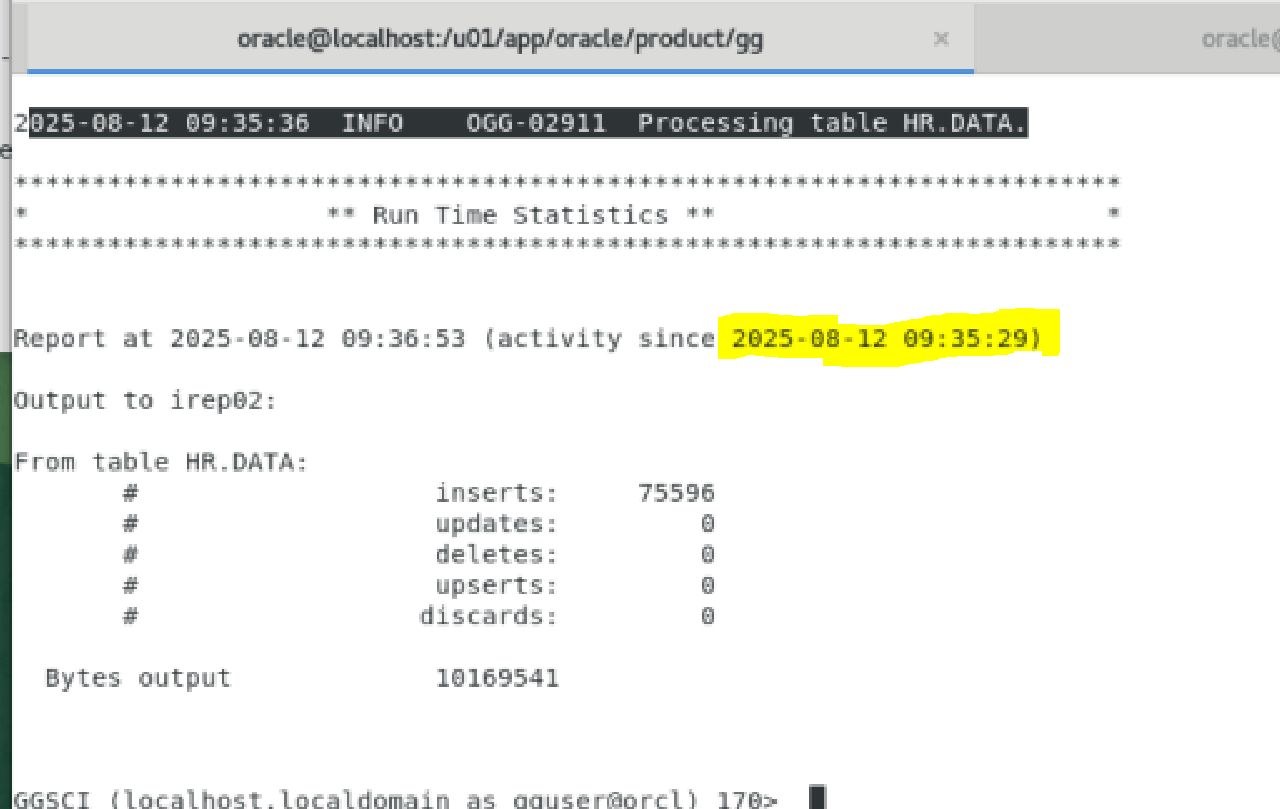
Check SCN of database before begin the intial load
SELECT CURRENT_SCN FROM V$DATABASE;

SELECT TIMESTAMP_TO_SCN(TIMESTAMP '2025-08-12 09:35:29') AS scn_value FROM DUAL;

SQL> SELECT TIMESTAMP_TO_SCN(TIMESTAMP '2025-08-12 09:35:29') AS scn_value FROM DUAL;

 SCN_VALUE
----------
   9272008
11. Now Add datapump process
GGSCI (localhost.localdomain as gguser@orcl) 50> view param dpext02

extract dpext02
RMTHOST localhost, MGRPORT 7809
RMTTRAIL /u01/app/oracle/product/gg/dirdat/ext02/rt
TABLE hr.data


--- Specify the source trail file from upper extract process
GGSCI (localhost.localdomain as gguser@orcl) 48> add extract dpext02 exttrailsource /u01/app/oracle/product/gg/dirdat/ext02/et
Extract added.

-- specify the remote trail file which it write at remote server
GGSCI (localhost.localdomain as gguser@orcl) 49> add rmttrail /u01/app/oracle/product/gg/dirdat/ext02/rt extract dpext02, megabytes 100
RMTTRAIL added.
12. Configure replicate process on destination server
-- Created rep02 replicat file
GGSCI (localhost.localdomain) 6> view param rep02
replicat rep02
USERID gguser@pdb1, PASSWORD gguser
DISCARDFILE /u01/app/oracle/product/gg/dirout/rep02.dsc, APPEND
MAP hr.data, TARGET scott.data;

-- specify the datapump output file as input in replication
GGSCI (localhost.localdomain as gguser@orcl) 63> ADD REPLICAT rep02, EXTTRAIL /u01/app/oracle/product/gg/dirdat/ext02/rt, CHECKPOINTTABLE gguser.chkpt
Replicat added.


GGSCI (localhost.localdomain as gguser@orcl) 195> start replicat rep02, atcsn 9272008

Sending START request to Manager ...
Replicat group REP02 starting.
13. Run the info all
GGSCI (localhost.localdomain as gguser@orcl) 196> info all

Program     Status      Group       Lag at Chkpt  Time Since Chkpt

MANAGER     RUNNING
EXTRACT     RUNNING     DPEXT02     00:00:00      00:31:22
EXTRACT     STOPPED     EXT0        00:00:00      01:20:23
EXTRACT     RUNNING     EXT01       00:00:00      00:00:03
EXTRACT     RUNNING     EXT02       00:00:00      00:00:07
REPLICAT    RUNNING     REP01       00:00:00      00:00:09
REPLICAT    RUNNING     REP02       00:00:00      00:00:01
14. Verify the data
  1* select count(*) from hr.data
SQL> /
  COUNT(*)
----------
     75596

SQL> insert into hr.data select * from hr.data;
75596 rows created.

SQL> select count(*) from scott.data;
  COUNT(*)
----------
     75596

SQL> commit;
Commit complete.

SQL> select count(*) from scott.data;

  COUNT(*)
----------
     75596
SQL> /
  COUNT(*)
----------
    151192