To check the uptime of a SQL Server instance, you can use the following query:
select sqlserver_start_time AS server_start_time,GETDATE() as currdate,DATEDIFF(SECOND, sqlserver_start_time, GETDATE()) AS uptime_in_seconds,
 DATEDIFF(MINUTE, sqlserver_start_time, GETDATE()) as uptime_in_minutes,
 FORMAT(DATEDIFF(SECOND, sqlserver_start_time, GETDATE()) / 86400.0, 'N2') AS uptime_in_days FROM
(
    select sqlserver_start_time from sys.dm_os_sys_info
) derived;
Output Example:

Explanation:
GETDATE():- Gets the current timestamp from the system.
DATEDIFF(SECOND, sqlserver_start_time, GETDATE()):- Calculates the uptime in seconds.
FORMAT(DATEDIFF(SECOND, sqlserver_start_time, GETDATE()) / 86400.0, 'N2'):- Converts uptime to days for better readability.
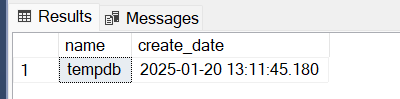
Other possible way is using TEMP tablespace creation time check:
select name, create_date from sys.databases where name='tempDB'Output:
Check from SQL Server Management Studio by using Reports section:
Right click on the Database server connection –> go to Reports –> go to Standard Reports –> Server Dashboard

Following snapshot show the time of server:

For SQL Server 2016 and earlier:
Use the following query instead:
SELECT
    sqlserver_start_time = MIN(login_time),
    GETDATE() AS currenttime,
    DATEDIFF(SECOND, MIN(login_time), GETDATE()) AS uptime_in_seconds,
    FORMAT(DATEDIFF(SECOND, MIN(login_time), GETDATE()) / 86400.0, 'N2') AS uptime_in_days
FROM sys.dm_exec_sessions
WHERE session_id = 1;
Here:

sys.dm_exec_sessions: Tracks all active sessions, where session ID1corresponds to the SQL Server’s internal system process.