Check the full status of RMAN backup in Oracle:
select a.Start_time,a.end_time,a.output_device_type,
 (case when a.INPUT_TYPE='DB INCR' and (b.incremental_level=0 or (b.backup_type='L' and b.incremental_level is null)) then 'DB Full'
 else a.INPUT_TYPE end) as backuptype,
 cast(a.ELAPSED_SECONDS as decimal(10,2)) as Timetaken ,a.status
from V$RMAN_BACKUP_JOB_DETAILS a LEFT OUTER JOIN V$BACKUP_SET b on a.session_recid = b.recid
where  a.start_time > sysdate - 15
UNION ALL
select START_TIME, END_TIME,output_device_type,operation,0,status from v$rman_status
where  start_time > sysdate-15 and operation  in ('DELETE')
order by Start_time
Output:
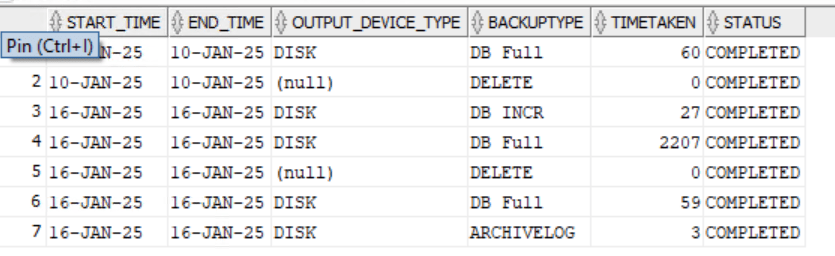
Note: Backup type
DB FULL means DB incremental take as 0 considered.
DB INCR means DB incremental level at 1
ARCHIVELOG means archive log backup
DELETE status means you run any delete command include archive log or obsolete backup