Dealing with the corrupt MariaDB database can be a difficult task, and there’s always a risk of severe data loss. Though, it is vital to create a backup of the database file before trying to repair MariaDB database. Here, in this blog, I will show you how to fix and restore a corrupt MySQL/MariaDB database. I will also discuss how to create a backup of the crucial data before fixing the database.
But I proceed further, let’s have a look at one of the real user’s examples.
Practical Scenario
Please help… My MariaDB database got corrupted after a sudden power failure. I tried numerous DB checks but still didn’t get succeed. Unfortunately, I don’t have a backup of my DB file so, please advise me on how to solve this issue.”
Any assistance would be appreciated!
Overview of the Steps to Fix a Corrupt Database on the Ubuntu 20.04 Server?
Follow the below comprehensive steps to repair the MariaDB database and later perform MySQL repair from a created backup.
Step 1- Creating Backup of a Corrupted MariaDB or MySQL Database
The very first and crucial step that you need to take is to create a backup of the data by copying /var/lib/mysql to a safe location.
To do this, run the below command:
cp -r /var/lib/mysql /home/USER/backup
Step 2- Start the Database in a Recovery Mode
In the second step, you have to locate a configuration file.
In Ubuntu 20.04, you will locate the configuration in: /etc/mysql/mariadb.conf.d/ .On other systems, you can go for the find command in order to locate a file: find /etc/ -name “my.cnf”.
For Ubuntu 20.04, run: /etc/mysql/mariadb.conf.d/50-server.cnf
Now, in order to enable the recovery mode, simply add the below line to it:
innodb_force_recovery = 3
After that, restart the database server:
systemctl start mariadb
Then, verify the status by: systemctl status mariadb
Step 3- Identify Corrupted Tables
Now, find out the corrupted database (MariaDB) file. In case, if you’ve 1 or 2 databases, it’ll be easy though.
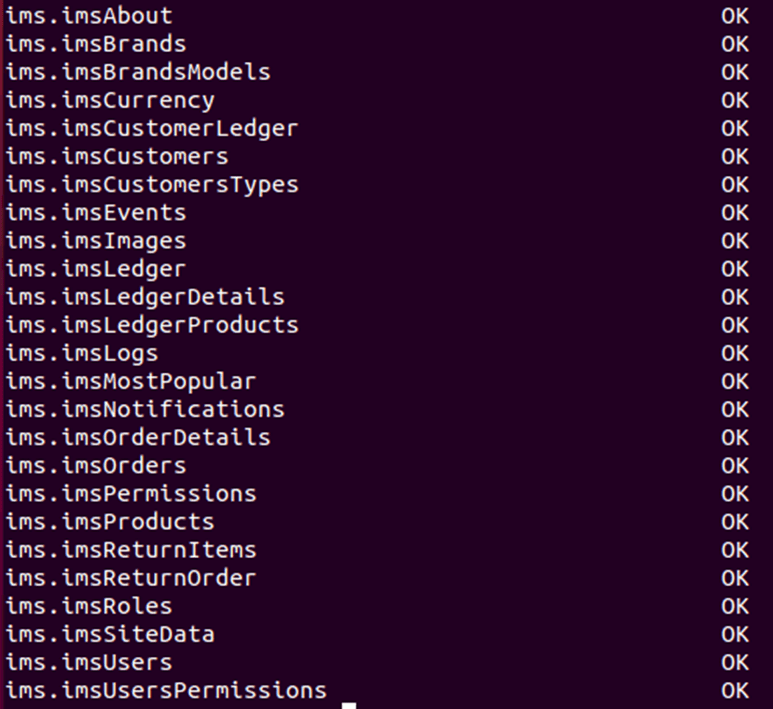
To check the database tables for corruption, you can use the mysqlcheck command. Here’s the command to run:
mysqlcheck -u USER -p DATABASE It might be possible that now you will be asked to enter the password. In many cases, you’ll see the OK for database tables there, if you can see any corrupted.
Step 4- Backup & Drop the Corrupt Database
In the fourth step, you will have to create a backup of a corrupted database by using the mysqldump.
To do this, run this command:
mysqldump –lock-tables -u USER -p DATABASE > /home/USER/backup/db-backup.sql
Now, login to a database & drop the corrupt database. At this time, you will have to stop a database server later.
drop database DATABASE;
systemctl stop mariadb You can remove the files & comment out the innodb_force_recovery = 3 in 50-server.cnf.
Run this command:
rm /var/lib/mysql/ib*
Step 5- Restarting the Database Server
Now, it’s time to restart the database server. Though if all goes well, the database server will start again normally.
systemctl start mariadb
Step 6- Restore the Database
The last step is to create the new database in database server by running this command:
create database DATABASE CHARACTER SET utf8mb4 COLLATE utf8mb4_general_ci;
After this, restore the database from a backup by using the mysql command. Here is the command for MySQL database recovery:
mysql -u USER -p DATABASE < /home/USER/backup/db-backup.sql
Now, verify the restored database by using the mysqlcheck:
mysqlcheck -u USER -p DATABASE
And you are done!
What to Do If Manual Way Fails to Repair MariaDB Database?
If the above manual method fails to repair the damaged MariaDB database, you can opt for reliable database repair software, such as Stellar Repair for MySQL.
Apart from fixing the database corruption, this MySQL recovery tool can even restore all the inaccessible database objects, like tables, views, forms, triggers, primary keys, and other data without modifying the original database.
Furthermore, this program not only repairs corrupt MariaDB or MySQL databases but also fixes corrupt InnoDB and MyISAM tables successfully.
Below you can find other outstanding features of this software:
- Easily repairs MySQL and MariaDB database files created on Linux or Windows.
- It has an interactive user interface.
- Saves the fixed files in MariaDB, MySQL, SQL Script, HTML, XLS, and CSV formats.
- It can repair various MySQL databases in a single attempt.
- Displays preview of the recoverable MySQL database objects before saving them.
- Supports Linux & Windows (10, 8.1, 8, 7, Vista, and XP) based systems.
So, just download & install this tool on your computer and follow the beneath steps:
Step 1- Launch Stellar Repair for MySQL software on your computer.
Step 2- Now, select the MySQL version from “Select Data Folder” dialog box >> click on the OK option.

Step 3- Next, choose the corrupt MariaDB database then click on “Repair” option to initiate the file repairing process.

Step 4- After that, the program will display the fixed table and other recoverable objects on your PC screen.
Step 5- Then, choose the database objects that you want to restore >> go to the File menu and click on Save option.
Step 6- From the Save Database dialog box, choose MySQL under Save Database >> then enter the necessary credentials to instantly connect to a Server.

Step 7- At last, click on the Save >> OK.

Now, you can find your fixed file in the exact location with a different name where the original database file is stored.
Wrap Up
By following the step-by-step technique stated above, you can fix and restore a corrupt MySQL or MariaDB database quickly. But don’t forget to create a backup of your vital database file before fixing it manually.
However, a manual solution can’t solve the severe database corruption and may lead to data loss. Therefore, if you cannot risk losing data, use an advanced Stellar Repair for MySQL tool and repair MariaDB database. This utility assists to fix the corrupted database table & recovers table properties, triggers, keys, etc. In addition, ensure to create a backup of your MySQL or MariaDB database regularly to minimize the risk of data loss due to database corruption.
Issuing the initial command in terminal elicits this response on Ubuntu 22.04:
cp -r /var/lib/mysql/plygell_cartref/padi/backup
elicits
cp: missing destination file operand after ‘ /var/lib/mysql/home/padi/backup’