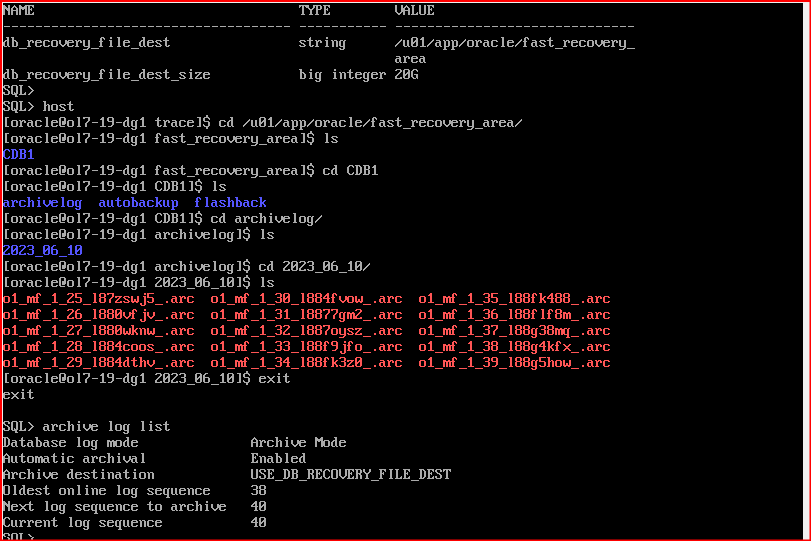
Check the USE_DB_RECOVERY_FILE_DEST in Archive list command
USE_DB_RECOVERY_FILE_DEST to indicate the Fast Recovery Area filesystem path which used to store the archive log when its set in archive log command.
SQL> archive log list
Database log mode                Archive Mode
Automatic archival               Enabled
Archive destination              USE_DB_RECOVERY_FILE_DEST
Oldest online log sequence       38
Next log sequence to archive     40
Current log sequence             40
Check the location of USE_DB_RECOVER_FILE_DEST parameter
USE_DB_RECOVERY_FILE_DEST point the location of DB_RECOVERY_FILE_DEST.
SQL>Show parameter DB_RECOVERY_FILE_DEST
NAME                        TYPE         VALUE
--------------------------  ----------  -----------------------------------
db_recovery_file_dest       string      /u01/app/oracle/fast_Recovery_area
db_recovery_file_dest_size  big integer 20G
You can go to the path and check the archivelog directory for your archive location.
Reset the USE_DB_RECOVERY_FILE_DEST if you want to configure it again.
alter system reset log_archive_dest_1 scope=spfile;
--Restart the database
Snapshot show the exact location of FRA as: