VBoxManage.exe: error: Could not find a registered machine named ‘rac1’
Error while adding the disk for shared use:
E:\rac>VBoxManage storageattach rac1 --storagectl "SATA" --port 1 --device 0 --type hdd --medium asm1.vdi --mtype shareable
VBoxManage.exe: error: Could not find a registered machine named 'rac1'
VBoxManage.exe: error: Details: code VBOX_E_OBJECT_NOT_FOUND (0x80bb0001), component VirtualBoxWrap, interface IVirtualBox, callee IUnknown
VBoxManage.exe: error: Context: "FindMachine(Bstr(a->argv[0]).raw(), machine.asOutParam())" at line 335 of file VBoxManageStorageController.cpp
Solution: Verify the name of machine present or created in Virtual Box, its case senstive so you have to give the name you created virtual machine in Oracle Virtual Box.
In my case i having machine name in upper case RAC1 that cause the problem.
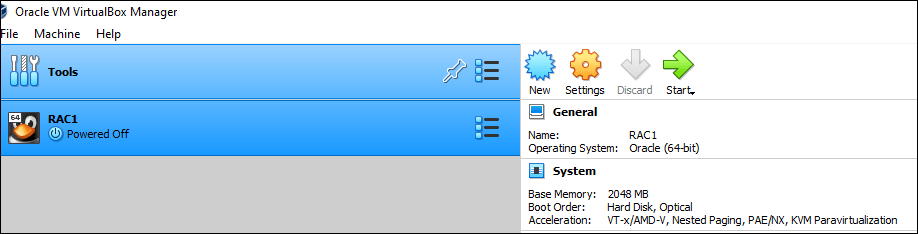
I run command again with upper case will fixed the issue:
E:\rac>VBoxManage storageattach RAC1 --storagectl "SATA" --port 1 --device 0 --type hdd --medium asm1.vdi --mtype shareable